
Alarm.com 781B Battery Video Doorbell (ADC-VDB781B)

The ADC-VDB781B battery-powered doorbell lets you expand your market by enabling installs anywhere—no wiring needed. Advanced AI features like Familiar Face analytics and package detection create easy upsell opportunities and more recurring revenue. With a versatile, replaceable battery pack and seamless integration—no hub required—installations are simple and service is efficient. The 781B helps you win more business and deliver unmatched value to your customers.
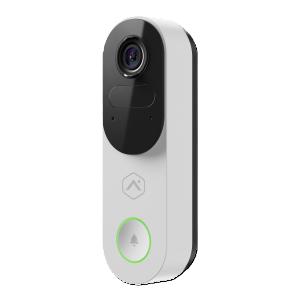
Key features
- Install at any entrance—no wires needed—plus enjoy multi-month battery life
- Never miss a thing with smart alerts for people, vehicles, packages, and even familiar faces
- See everything at your doorstep, with crystal-clear 2.4 MP video and an expansive 148° x 148° field of view
- Protect your home proactively with Perimeter Guard® warning sounds and the ability to talk to visitors from anywhere
- Easily recharge, swap batteries, or opt for wired charging and chime support
Included accessories
- ADC Universal Battery Pack
- ADC-VDB781B wallplate (with pre-assembled set screw and wire terminal screws)
- 5º tilt wedge (optional)
- Security screw tool
- M3.5 wallplate mounting screws 20 mm length (x2)
- M3.5 drywall anchors 25 mm length (x2)
- Conical anchors for concrete installations (x2)
- M3 wedge mounting screws (x2)
- Wallplate rubber spacers (x2)
- USB-C charging cord
- Installation card with scannable QR code
Additional accessories
| Accessory name | Accessory SKU |
|---|---|
| Accessory Battery Pack for Alarm.com Indoor/Outdoor Battery Camera | ADC-VACC-BAT-2LIB18650 |
| VDB781B Wedge Mount Kit | ADC-VDBA-781B-WMK |
Specifications
Specifications
| Max resolution | 1536 x 1536 |
|---|---|
| Recording compression | H.264 |
| Image sensor | 1/3" Color CMOS |
| Field of View | 148° Horizontal, 148° Vertical |
| Motion detection mechanism | Passive infrared (PIR) sensor |
| Ingress protection | IP54 |
| IR range | Up to 15 feet (~5 meters) |
| Image adjustments | Flip, brightness, contrast, saturation, sharpness, exposure |
| Wi-Fi connectivity |
|
| Ethernet connection | Incompatible |
| Battery capacity | 6450 mAh |
| Charging time | Approximately 5 hours |
| Wired charging | AC transformer input at doorbell terminals:
|
| Operating temperature | -4°F to 113°F (-20°C to 45°C) |
| Operating humidity | 20% – 100% non-condensing RH |
| Dimensions (W × L × D) | 2.0 × 6.3 × 1.34" (51.3 × 160 × 34 mm) |
| Compliance | FCC, IC, CE, RCM |
Feature compatibility quick facts
Feature compatibility quick facts
| Enrollment methods | BLE mode, AP mode, WPS mode For enrollment instructions, see Alarm.com Battery Doorbell Camera (ADC-VDB781B) - Installation Guide. |
|---|---|
| Video Analytics | Battery Analytics for Person, Animals, and Vehicles For more information, see Configure a Video Analytics rule. |
| Familiar Face Analytics | Compatible For more information, see Familiar Face Analytics. |
| Familiar Vehicle Analytics | Incompatible |
| Two-Way Audio | Full-Duplex For more information, see Interact with visitors and devices using the Doorbell Camera call screen. |
| Onboard Recording with SD card | Incompatible |
| Perimeter Guard | Compatible For more information, see Perimeter GuardTM for video devices. |
| Manually Triggered Warning Sounds | Compatible For more information, see Manually Triggered Warning Sounds for proactive video deterrence. |
| AI Deterrence | Compatible |
| Privacy Zones | Compatible |
| Factory Reset | Press and hold the doorbell button for 45-50 seconds until the LED starts blinking red and green. |
LED reference guide
LED reference guide
Note: When operating on battery power, the status LED will light up in response to motion or when the camera’s state is altered (i.e., button press events, booting on, firmware upgrades, and deterrence responses).
| LED pattern | Description |
|---|---|
|
Off
|
Power off or standby |
|
Solid green
|
Connected to Alarm.com |
|
Blinking green
|
Local network connection |
|
Blinking red
|
Power on, camera booting |
|
Solid red
|
No local or internet connection |
|
Solid blue
|
Low battery |
|
Blinking white
|
BLE mode and AP mode (press and hold the button for 30-35 seconds) |
|
Blinking blue
|
WPS mode (press and hold button for 35-40 seconds) |
|
Blinking yellow
|
Power cycling (press and hold button for 40-45 seconds) |
|
Blinking red and green
|
Reverting to factory default settings (press and hold the button for 45-50 seconds) |
|
Blinking green and blue
|
Firmware updating |
|
Blinking red and blue
|
Perimeter Guard camera light alert activation |












Battery pack charging
| LED pattern | Description |
|---|---|
|
Solid red
|
Charging |
|
Blinking red and blue
|
Charging failed |
|
Solid blue
|
Charged and connected to Alarm.com |
Installation guides
- Bluetooth Mode Installation guideBluetooth® (BLE) mode allows for devices to be added to a secure home wireless network by connecting to the device from a mobile device (e.g., phone) using Bluetooth and selecting the desired network. The capability offers support for saved networks and the installation wizard includes active error handling. This capability also makes it easier to troubleshoot cameras that fall offline by providing a quick way to reconnect.
User guides
- Adjust the Motion Sensitivity on a battery-powered cameraThe Motion Sensitivity setting for Alarm.com battery-powered cameras controls the sensitivity of the passive infrared (PIR) sensors that are responsible for motion detection. Smaller values correspond to a smaller detection radius, while larger values correspond to a larger detection radius. This setting helps determine how likely the device is to wake up when it detects motion.
- Battery charge levels for shipped Alarm.com battery-powered video devicesDevices ship at >50% charge from the factory ♦ Actual received charge may be lower due to normal lithium-ion self-discharge ♦ Installation can typically proceed without pre-charging ♦ If the battery is below 20%, charge the device before installing
- Configure a Video Analytics ruleAlarm.com Video Analytics continuously scans a property and sends a notification when a person, vehicle, or animal is identified. Advanced detection rules enhance perimeter security by sending alerts when someone is coming or going, or even loitering on the property.
- Create Low Battery and Depleted Battery notifications for video devices
- Create temperature notifications for video devicesYou can receive notifications when an Alarm.com Wireless Video Doorbell's internal temperature nears the bounds of the operational temperature range.
- View the battery status of a video device
How-to troubleshooting guides
Frequently asked questions
- What is WebRTC end-to-end video streaming?WebRTC is one type of technology that Alarm.com uses to establish a connection between a camera and a customer device. It is supported by all major browsers and is widely used in real-time communication applications, including Google Meet and Microsoft Teams.
Videos
Training
General information
- AI Deterrence (AID) Autonomous Audio Response Service
- Adjust how long to request clip uploads during an alarmVideo devices can be configured to upload back-to-back clips during an alarm for 1 to 15 minutes using the website.
- Adjust saved video resolution, image quality, or frame rateVideo settings can be customized for each camera and video device.
- Adjust the live image quality of a cameraLive video image quality can be changed to improve either motion clarity. Increasing the video image quality improves the fine details in the picture — decreasing the video image quality reduces the amount of bandwidth the video device needs.
- Adjust the wedge type for an Alarm.com Video DoorbellWhen a wedge mounting bracket is used to install an Alarm.com Video Doorbell, it may be necessary to enable and/or adjust the wedge setting for optimal Video Analytics motion detection. This process can be completed using the Customer website or Customer app.
- Alarm.com video ports and protocols requirements
- Are there additional mounting brackets for Alarm.com Video Doorbells?
- Change a video device nameVideo device names can be customized for easier system management and camera identification using the MobileTech app, Customer app, or Customer website.
- Change the Wi-Fi network settings of a video deviceYou can change a video device's network information manually using the Customer website as long as the device has power and is still connected to an active network.
- Change the video alert format
- Configure Privacy Zones for video devicesDraw Privacy Zones to obscure parts of a video device's view (i.e., public sidewalks or a driveway) from all future live and recorded footage. Up to three Privacy zones per camera can be configured using the Customer website.
- Configure the chime settings for an Alarm.com Video Doorbell and Alarm.com Chime
- Create/edit a camera group
- Do Alarm.com cameras have a default IP address?Alarm.com cameras do not have a default IP address before installation and require a network with Dynamic Host Configuration Protocol (DHCP) enabled to enroll.
- Familiar Face AnalyticsVideo customers will have a clearer picture of who is coming and going with Familiar Face Analytics. This capability allows customers to teach their video device to recognize up to 5 familiar faces—like family, friends, or trusted visitors—and receive personalized alerts when they arrive.
- How often does Alarm.com check the connectivity of the video cameras?Video camera connectivity is verified every 8 hours.
- Interact with visitors and devices using the doorbell camera call screenUsing Alarm.com doorbell cameras one can talk to individuals at their door using the Customer app or a compatible panel. This article provides more details about this interaction.
- Manually Triggered Warning Sounds for proactive video deterrenceManually Triggered Warning Sounds allow customers to actively deter unwanted visitors when an Alarm.com camera spots an intruder. This feature adds a new layer of engagement and awareness to video accounts by allowing users to respond directly to trespassers in real-time.
- Package Alerts for Alarm.com Video DoorbellsPackage Alerts can be configured to send notifications right when a courier delivery is made, remind you if the box is not picked up, or alert you if it goes missing. The feature can be set up from the Recording Rules section of the Customer website and Customer app.
- Perform an Internet speed testAn Internet speed test can help determine if a network has the bandwidth required to support Alarm.com video devices.
- Perimeter Guard™ for video devicesStop intruders in their tracks with Perimeter Guard™ proactive defense. Perimeter Guard™ uses Alarm.com's advanced Video Analytics to sound an alert and flash the camera's status LED when unwanted visitors are detected.
- Reconnect a camera to a wireless network if the router, equipment, or Wi-Fi settings change
- Request the wireless signal strength of a video deviceVideo device wireless signal strength can be checked remotely for devices on the customer account at any time using the Customer app or Customer website, or during installation for supported devices using the Customer app. It is generally recommended for video devices to have at least 66% wireless signal strength.
- Two-Way Audio Installation and User GuideTwo-Way Audio lets users talk and listen remotely through compatible video devices and hear recorded audio in saved clips. It works in the Customer app, Customer website, and on some supported panels when live video streaming is enabled. Supported cameras use either Half-Duplex audio, which requires pressing and holding to talk, or Full-Duplex audio, which allows simultaneous speaking and listening.
- Update the firmware of a video deviceThe firmware of an Alarm.com video device can be updated remotely using the Partner Portal, MobileTech app, or Customer website. Keeping the firmware up-to-date ensures that the device will be compatible with new features.
- What are the internet service and bandwidth requirements for Alarm.com video devices?The upload speed bandwidth requirements for Alarm.com video devices. The network requirements can vary based on the model or camera type.
- What are the power requirements for Alarm.com Video Doorbells?
- What internet browser software is needed to use Alarm.com video devices?The Alarm.com Customer website supports most popular desktop and laptop browsers, including Google Chrome, Microsoft Edge, Safari version 10.1 or later, and Mozilla Firefox.
- What is the difference between Half-Duplex and Full-Duplex audio?♦ Half-Duplex audio allows only one communication channel to be used at a time, similar to a walkie-talkie or traditional two-way radio. These devices require the user to manually enable and disable the camera's microphone and speaker. ♦ Full-Duplex audio allows both communication channels to speak and listen simultaneously, similar to a telephone call. These devices require the user to tap or click the microphone icon once to toggle on microphone and speaker functionality during a stream.
- What is the supported American Wire Gauge (AWG) for a video doorbell camera?18-20 gauge wire (AWG) is supported for all video doorbell camera installations. 18-20 AWG provides the correct amount of resistance needed to power an Alarm.com Video Doorbell camera. Gauges outside of these recommendations affect the resistance of the wire and may deliver incorrect power to the device.
- When does live or saved video contain audio?
- Which wireless protocols do Alarm.com video devices support?