
1080p Mini-Bullet Camera (ADC-VC727P)

| Device Image | 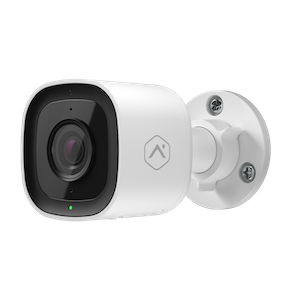 |
|---|---|
| Live View Resolution | 1920x1080 |
| Field of View | 117° |
| Night Vision | 0 lux with IR,up to 49 ft (15 m) |
| Enrollment Methods | Ethernet |
| Ethernet compatibility | 10/100 Mbps RJ-45 Ethernet |
| Wi-Fi Compatibility | Incompatible with Wi-Fi |
| Video Analytics |
Video Analytics 1.0 For Video Analytics setup instructions, see Configure a Video Analytics rule. For Business Activity Analytics setup instructions, see Business Activity Analytics (BAA) setup. |
| Video Motion Detection |
Compatible For Video Motion Detection setup instructions, see Configure Video Motion Detection (VMD) settings for a video device. |
| Onboard Recording |
Compatible For Onboard Recording setup instructions, see Onboard Recording with Smart View for video devices. |
| Two-Way Audio |
Half-Duplex For Two-Way Audio setup instructions, see Two-Way Audio Installation and User Guide. |
| Factory Reset |
Press and hold the Reset button until the LED is flashing Green and Red (about 15 seconds), then release the button. The camera will reboot with factory defaults. For additional instructions, see Factory reset an ADC-VC727P to its default settings. |
Installation guides
- 1080p Mini-Bullet Camera (ADC-VC727P) - Installation GuideInstall and add the ADC-VC727P camera by connecting it to a router with an Ethernet cable, supplying power through PoE or an optional 12 VDC AC adapter, and waiting for the LED to turn solid green to confirm connection to Alarm.com. The guide also explains LED status meanings, mounting requirements, weather-resistant RJ45 cap use, grounding steps, and troubleshooting for connection, reset, and account transfer issues.
User guides
- Factory reset an ADC-VC727P to its default settingsResetting a video device to its factory defaults removes all programming and memory from the device.
- Configure a Video Analytics ruleAlarm.com Video Analytics continuously scans a property and sends a notification when a person, vehicle, or animal is identified. Advanced detection rules enhance perimeter security by sending alerts when someone is coming or going, or even loitering on the property.
How-to troubleshooting guides
Frequently asked questions
Videos
Training
General information
- Adjust the field of view and focus of a varifocal video deviceA varifocal lens lets users adjust a camera’s zoom and focus from the Customer website without losing video quality. Compatible models include select Pro Series and Prism Series varifocal bullet, turret, and dome cameras. Users can change the field of view with a slider, manually adjust focus or use Auto Focus, then recalibrate Video Analytics and update any Video Analytics or Business Activity Analytics rules after changes.
- Can a video device use both an Onboard (SD card) and SVR recording schedule simultaneously?Yes. A video device can record continuously to an Onboard recording schedule and SVR recording schedule at the same time.
- Commercial video internet bandwidth guidelines
- High Dynamic Range (HDR) for video devicesCameras equipped with High Dynamic Range (HDR) can show more detail in the dark shadows and bright highlights of an image. HDR is especially useful for capturing clear video in areas with harsh lighting conditions (e.g., a camera on a covered porch, under an awning, facing a bright light source, etc.).
- How much Onboard Recording footage can be stored on a microSD card?
- How well can Alarm.com cameras see in the dark? (night vision, infrared)
- Onboard Recording (SD card) with Smart View for video devices
- Pro Series Commercial Camera Mounting Plates (ADC-VACC-MNT110/130) - Data Sheet
- Pro Series Commercial Camera Mounting Plates (ADC-VACC-MNTVS/MNTVL) - Data Sheet
- Update the firmware of a video deviceThe firmware of an Alarm.com video device can be updated remotely using the Partner Portal, MobileTech app, or Customer website. Keeping the firmware up-to-date ensures that the device will be compatible with new features.
- View continuously recorded video using Smart ViewStream footage is recorded using a Stream Video Recorder (SVR) or an Onboard Recording rule at any time using Smart View. Playback of continuously recorded video is available using the Customer website or Customer app. This article details how to view, navigate and download clips from the Smart View timeline.
- What is the maximum resolution for Pro Series video cameras?