
Indoor Fixed wIR (ADC-V521IR) - Data Sheet
The ADC-V521IR is Alarm.com’s latest wireless IP night vision camera. Designed specifically to work with the Alarm.com hosted video service, it provides a professional surveillance solution. HD 720P live and recorded video are available to customers through web-enabled computers, cell phone web browsers and using our free downloadable apps compatible with all Alarm.com enabled mobile devices. This camera has been designed to see at a distance of over 20 feet in the dark. Plus, wireless set-up is a breeze with push button wireless set-up using the WPS button.
Included accessories
- Camera Stand
- Wall Screws
- Wall Mount
- Ethernet Dongle
- Power Adapter (8 feet)
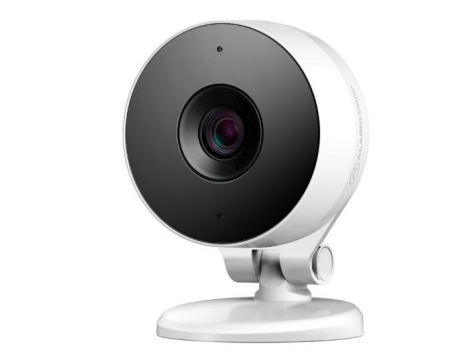
Specifications
| Live resolution options | 1280x960, 800x600, 640x480, 320x240, 176x144 |
|---|---|
| Recording resolution options | 1280x800, 600x400, 300x200 |
| Live quality | High, medium and low compression options |
| Recording quality | High and medium compression options |
| Recording compression | H.264, MPEG-4 |
| Image sensor | 1/3.2” CMOS, 1280x800 |
| Iris | Fixed Iris, F2.2 |
| Focal Length | F = 2.38 mm |
| Field of view | 112° (horizontal) 100° (vertical) |
| Low-light sensitivity | 0 lux with IR on |
| IR LED illumination | 6 meters |
| Image adjustments | Brightness, Contrast, Saturation, Sharpness, Exposure |
| Video motion detection | 3 windows, adjustable sensitivity and threshold |
| Ethernet connection | 10/100 Mbps RJ-45 |
| Wireless encryption | WEP, WPA or WPA2 |
| Wi-Fi 802.11 Support | b/g/n |
| Password authentication | “Digest” authentication |
| Simultaneous viewers | 10 |
| Privacy Button | No |
| Operation temperature | 32° ~ 104° F (0°C ~ +40°C) |
| Operating humidity | 20% ~ 80% RH |
| Max power consumption | 12V DC, 5W |
| Dimensions (LxWxH) | 2.76", 1.65", 3.83" |
| Weight | 4.2 oz |
| Two-Way Audio Compatibility |
Firmware version IP8137-ALAM-0100d1 + For more information about Two-Way Audio, see Two-Way Audio Installation and User Guide. |
Note: For information about frame rate (FPS), see What is the frame rate for video?.
Network requirements
| Network | 2.4 GHz Wi-Fi connection to broadband Internet |
|---|---|
| Minimum bandwidth |
Without Two-Way Audio: 0.25 Mbps With Two-Way Audio: 0.75 Mbps For more information, see What are the internet service and bandwidth requirements for Alarm.com video devices?. |
LED Guide
| LED pattern | Status | Description |
|---|---|---|
|
Solid green
|
Connected to internet | Local network and internet connection with Alarm.com IP. |
|
Blinking green
|
Local network connection |
Local network connection with a local IP address, no internet. Note: If the LED does not go to solid green after a few minutes, see Camera LED is blinking green. |
|
Solid red
|
Power on, or no network connection |
Power on, system booting up typically 60–90 seconds. If solid red for longer than 60–90 seconds, then there is no local or Internet connection. |
|
Blinking red
|
Camera powering on, or firmware update | Camera is powering on, or a firmware update is in progress. |
|
Blinking blue
|
WPS mode |
WPS mode is active. To enter WPS mode, press and hold the WPS button for about three seconds. |
|
Blinking white
|
AP mode |
Wi-Fi access point (AP) mode is active. To enter AP mode, press and hold the WPS button for about six seconds. |
|
Blinking red and green
|
Factory reset |
The camera is restoring to factory default settings. Caution: If the camera is already installed, it may need to be removed from the Alarm.com account and re-added after a factory reset. To perform a factory reset, press and hold the reset button for 10–15 seconds. |







Note: The WPS and reset options share the same button on the ADC-521IR.