
Outdoor PoE (ADC-V720) - Data Sheet
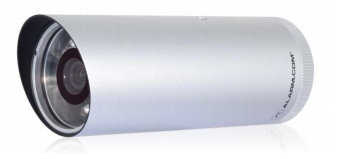
The ADC-V720 is an outdoor IP night vision camera designed specifically to work with the Alarm.com hosted video service. It provides a professional surveillance solution. HD 720P live and recorded video are available to customers through web-enabled computers, cell phone web browsers, and using free downloadable apps compatible with all Alarm.com enabled mobile devices. This camera has been designed to see at a distance of over 39 feet in the dark (black and white) while still delivering true daytime colors during the day thanks to the mechanical IR cut filter. This camera is easy to set up and supports the Power over Ethernet feature.
Specifications
| Live resolution options | 1280x800, 640x400, 320x200, 176x144 |
|---|---|
| Recording resolution options | 1280x800, 640x400, 320x200 |
| Live quality | High, medium, and low compression options |
| Recording quality | High and medium compression options |
| Recording compression | H.264, MPEG-4 |
| Image sensor | 1/4” CMOS, 1280x800 |
| Iris | Fixed Iris, F1.8 |
| Field of view | 77° (horizontal) 54° (vertical) |
| Low-light sensitivity | 0 lux with IR on |
| IR LED illumination | 12 meters |
| Image adjustments | Brightness, Contrast, Saturation, Sharpness, Exposure |
| Video motion detection | 3 windows, adjustable sensitivity and threshold |
| Digital input trigger | Yes |
| I/O Triggered Video Recording | For more information, see Outdoor PoE - (ADC-V720) Digital Input Trigger Guide. |
| Ethernet connection | 10/100 Mbps RJ-45 |
| Password authentication | “Digest” authentication |
| Simultaneous viewers | 10 |
| Operation temperature | ~4° ~ 122° F (-20°C ~ +50°C) |
| Operating humidity | 0% ~ 90% RH IP66 |
| Max power consumption | 12V DC, 5.9W |
| Weatherproofing rating | Ingress protection IP66 |
| Max power consumption | 12V DC, 5.8W |
| Dimensions (LxD) | L:155mm, ø:60mm |
| Weight | 28.6 oz. |
Note: For information about frame rate (FPS), see What is the frame rate for video?.
Network requirements
| Minimum bandwidth |
0.25 Mbps For more information, see What are the internet service and bandwidth requirements for Alarm.com video devices?. |
|---|---|
| PoE standard |
IEEE 802.3af For more information about PoE, see How does Power-over-Ethernet (PoE) work with Alarm.com video devices?. |
LED guide
Install
| LED | LED status | Description |
|---|---|---|
 |
All off | Power off |
 |
Solid red | Power on, system booting |
 |
Green blink every second | Local network connection with local IP address |
 |
Solid green | Full internet connection with Alarm.com IP |
Trouble conditions
| LED | LED status | Description |
|---|---|---|
|
Solid red | No local or Internet connection |
Maintenance
| LED | LED status | Description |
|---|---|---|
 |
Red blink every 0.15 second | Upgrading firmware |
 |
Red blink every 0.15 second + green blink every 0.15 second | Restoring factory default settings |