
Z-Wave Remotes Overview
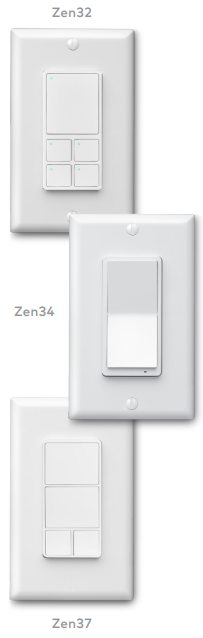
Added Convenience for Scenes Control. With Z-Wave® Remotes (Zooz Zen32, Zen34, and Zen37) your customers can seamlessly activate all their Scenes without opening the Alarm.com app or going to the panel. Configure remote-triggered Scenes from the Rules Builder on the mobile app and website.
Key features
Seamless Setup
Once remotes are powered on and added to the system, customers easily configure button actions from the Device Settings page. Each button supports up to 6 actions, including single, double, triple, quadruple, quintuple press, and button held down—allowing for up to 30 Scenes to be triggered from a single remote.
Flexible Installation
Mount remotes to the wall or carry throughout the property for additional convenience. Zooz Zen remotes are Z-Wave Long range (ZWLR) enabled for increased range and reliability.
Note: ZWLR is available for 2GIG EDGE panels running firmware 1.3+.
Increase Adoption and Convenience
Z-Wave Remotes provide your customers with another convenient way to control their system. Easy-to-install and cost-effective, remotes can help boost system usage and Scenes adoption, ultimately leading to a stickier, more engaged customer.
Visit the Alarm.com Partner Portal to purchase Zooz Zen Z-Wave® Remotes and access marketing, installation, and support resources. For more information, see Z-Wave® Remotes User Guide.