
Reader-Based Anti-Passback
When enabled, Reader-Based Anti-Passback prohibits access when a user's Access Control credential is used a second sequential time when attempting to enter the same secured area before the preset time has expired.
Features
- Anti-Passback is enabled on a per-reader basis.
- A violation occurs when a user swipes the same badge more than once within the timeout period unless the timeout period has been cleared. The timeout period is cleared when either:
- Any other badge is swiped at the original reader.
Example: If card ID 5555 is granted access at Door A, and then card 1234 is granted access at Door A after, card ID 5555 will be able to re-enter Door A within the specified delay period without violating the Reader-Based Anti-Passback rule. - The original badge is swiped at any other reader on the same controller as the original reader.
Example: A user accesses Reader 1 (connected to Controller A) with a timeout of 5 minutes. If they access Reader 2 (also connected to Controller A) within those 5 minutes, the timeout is removed from Reader 1 and the user can access Reader 1 immediately.
- Any other badge is swiped at the original reader.
- Timeout periods can be configured for 15, 30, or 45 minutes, 1 to 23 hours, or 1 to 7 days.
- If an Anti-Passback violation event occurs, the user's name will appear in Activity and the Event History.
- The timeout does not restart if a violation occurs during the timeout period.
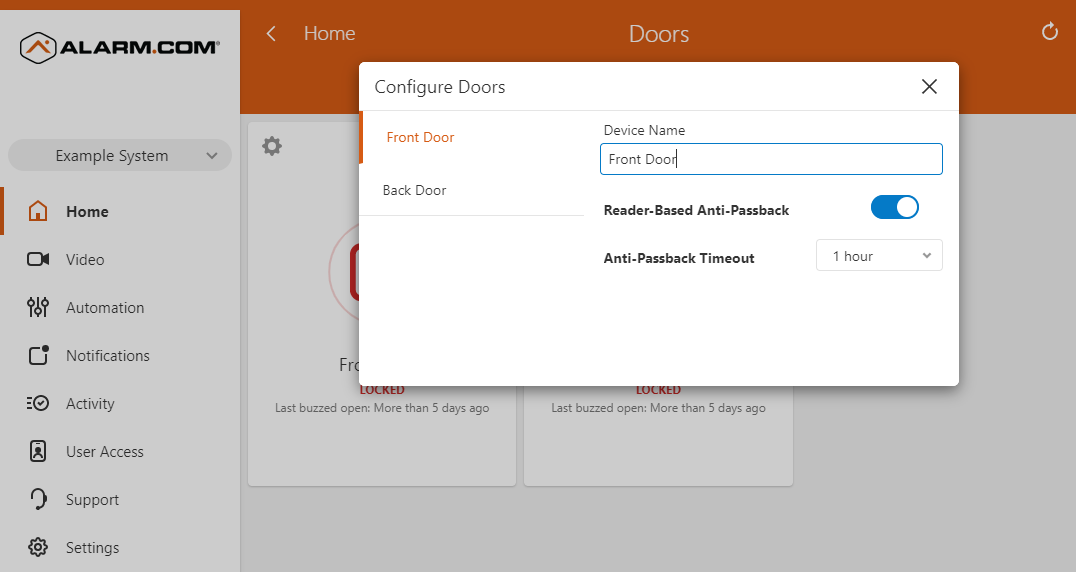
To enable the Reader-Based Anti-Passback requirement on a door:
Note: The option to enable the Reader-Based Anti-Passback feature for a door is only available using the Alarm.com customer website.
- Log into the Alarm.com customer website.
- In the Doors card, click
 .
. - Locate the desired door, then click
 .
. - Click the Reader-Based Anti-Passback toggle switch to enable it.
- Using the Anti-Passback Timeout dropdown menu, select the desired time before a valid Access Control credential can be sequentially used.
Assign a user an Anti-Passback exception
A user can be assied an Anti-Passback exception using the Alarm.com customer website or Alarm.com app.
To assign a user an Anti-Passback exception using the Alarm.com customer website:
Note: When adding or editing a user, changes made to new or existing users will process 2 minutes after the last user credential change is made. When revoking a user's access, the change will process immediately after saving.
- Log into the Alarm.com customer website.
- Click User Access.
- Click Users.
- Click Add User.
- To assign an Anti-Passback exception to an existing user, click
 next to the desired user, then click
  .
.
- To assign an Anti-Passback exception to an existing user, click
- Click the Anti-Passback Exception toggle switch to exempt the user from all Anti-Passback rules.
To assign a user an Anti-Passback Exception using the Alarm.com app:
Note: When adding or editing a user, changes made to new or existing users will process 2 minutes after the last user credential change is made. When revoking a user's access, the change will process immediately after saving.
- Log into the Alarm.com app.
- Tap
 .
. - Tap User Access.
- Tap
 next to Access Plans.
 - Tap Users.
- Tap
 .
.
- To assign an Anti-Passback exception to an existing user, tap next to the desired user, then tap .
- To assign an Anti-Passback exception to an existing user, tap
- Tap the Anti-Passback Exception toggle switch to exempt the user from all Anti-Passback rules.