Delete saved video clips
Saved video clips can be deleted to make room in the online storage for new clips to be recorded. When the online storage is full, the oldest saved video clips will be deleted as new ones are recorded.
Caution: Video clips cannot be retrieved once deleted. Video clips can only be viewed and deleted with a customer's login. Viewing and deleting video clips cannot be done using Log In with Access. For more information about logging in with access, see Using Log In with Access.
To delete video clips
To delete video clips using the Alarm.com customer website
- Log in to the Alarm.com customer website.
- Click Video.
- Click Saved Video Clips.
- Mouse over the desired clip, then click
 .
. - Click
 Delete Clip.
To delete multiple video clips at once:
- Log in to the Alarm.com customer website.
- Click Video.
- Click Saved Video Clips.
- Click Bulk Actions.
- Click each desired clip or click
 to select all the videos shown on the page.
 - Click . If the selection includes any protected clips, they must be unprotected before they can be deleted. To unprotect all selected video clips, click
 .
.
To delete video clips using the Alarm.com app
- Log in to the Alarm.com app.
- Tap Video.
- Tap Saved.
- Tap
 to select the video clips to be deleted.
 - Tap .
- Tap Delete.
- Tap Delete again to permanently delete the clip.
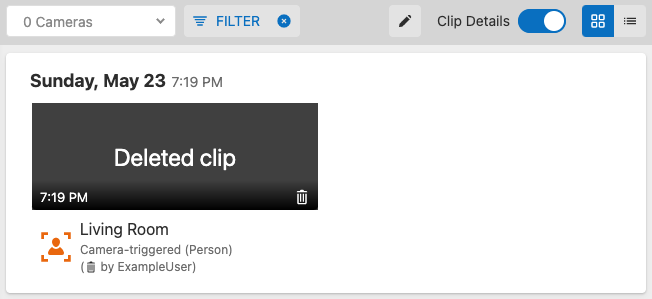
To find which user deleted a video clip:
Note: Details about deleted clips are only retained on the Alarm.com customer website for 60 days and cannot be viewed afterwards.
- Log in to the Alarm.com customer website.
- Click Video.
- Click Saved Video Clips.
- Click Filter.
- In Status, click to select Deleted. Deselect the other options in Status to only show deleted clips.
- Click Apply.
- The username of the user who deleted the clip appears as ( by username). If the username does not appear in gallery view, verify that the Clip Details toggle switch is toggled on.