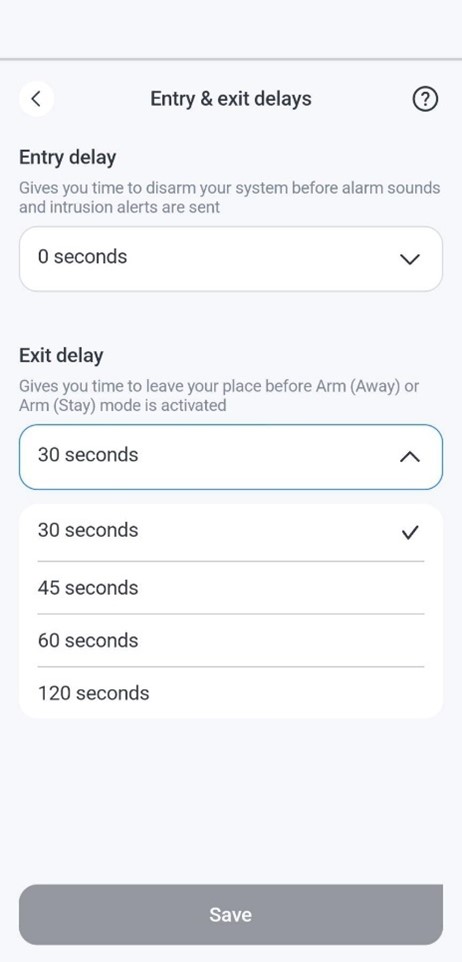
Set entry and exit delays on the nami Alarm Pod
Entry delays on nami
An entry delay is the time between when an entrance to an armed space is detected and when the alarm is triggered. For instance, if a home has an entry delay configured and the security system is set to Arm (Away), someone coming home and opening the door would start the entry delay countdown, during which the security system can be disarmed without triggering the alarm.
Once the nami system detects an entrance, the Alarm Pod in the armed Area will emit reminder beeps for the duration of the entry delay, allowing for time to disarm the system.
By default, the entry delay is 30 seconds, but it can be set to any value between 0 and 120 seconds.
Exit delays on nami
An exit delay is the time between when the Area is set to Arm (Away) and when the Area is fully armed, to allow time to leave the Area without triggering the alarm. For instance, for a home with an exit delay configured, someone leaving the home could set the nami system to Arm (Away) either via keypad or the customer app and have the duration of the exit delay to leave the premises before the Area is armed.
Upon setting the system to Arm (Away), the Alarm Pod will emit reminder beeps for the duration of the exit delay, prompting users to exit the Area before the Arm (Away) setting is fully activated.
By default, the exit delay is 60 seconds, but it can be set to any value between 30 and 120 seconds.
To set the entry and exit delays using the Alarm.com app:
- Log in to the Alarm.com app.
- Tap Security System to open the Security System page.
- Tap
 to open the Security System Settings page.
 - Tap Entry & exit delays.
- Use the dropdown menus to select the desired entry and exit delays.
- Tap Save.