
Factory reset a Yale Real Living B1L Push Button Deadbolt (YRD110)
|
The content on this page has been written by a third party and is not maintained by Alarm.com. Any questions regarding the installation, maintenance, and/or usage instructions in this guide should be directed to the device manufacturer. To access the full installation guide, see Yale Real Living B1L Push Button Deadbolt (YRD110) - Installation Guide. |
When the lock is reset to factory default settings, all user codes (including the Master PIN code) are deleted, and all programming features are reset to original default settings.
Note: Upon reset, master code creation is the only option available and must be performed prior to any programming of the lock. After setting the master code, press any key to complete the handing of the lock.
To factory reset a Yale Real Living B1L Push Button Deadbolt (YRD110):
- Remove the battery cover.
- Remove the batteries.
- While pressing the reset button for at least 3 seconds, reinstall batteries, then release the reset button.
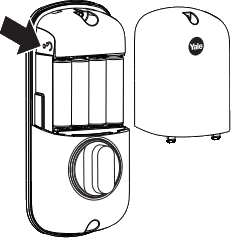
- Replace the battery cover.