
Monitoring Station supported features
Alarm.com integrates with most monitoring stations to offer new features, like Alarm.com's award-winning Smart Signal, that helps improve the customer's experience. Smart Signal enables customers to directly communicate with their monitoring station from the Alarm.com app during alarm or emergency events, so they can quickly cancel or verify an alarm or activate a panic signal.
For information about activating Smart Signal for customer accounts, see Activate Smart Signal (Cancel/Verify or In-App Panics) on a customer account.
Cancel / Verify
Users can quickly decide whether the alarm was an accident or if help is needed, allowing for faster notifications to the monitoring station.
When an alarm event occurs, users will see a Cancel/Verify alarm card at the top of their home screen in the app. Users can quickly scroll to review their images or videos, while the alarm card remains at the top.
Users simply hold either Cancel Alarm or Verify Alarm for three seconds to let the monitoring station know how to address the situation.
.png?revision=1)
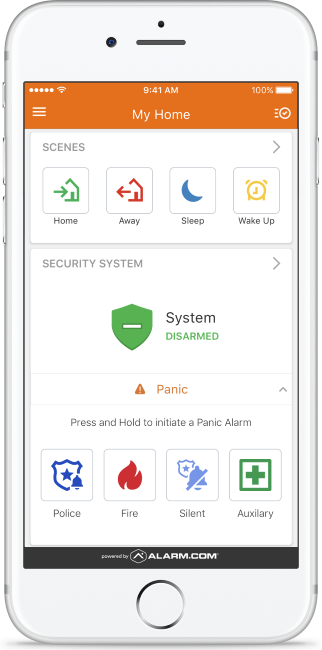
In-App Panel Panic
If a user cannot make it to the panel or call 9-1-1, they can send a panic signal right from the app.
Users will just need to tap Panic in the Security System card and emergency personnel will be alerted that help is needed in the home.
Depending on the panel, the Alarm.com app supports fire, auxiliary (medical), police, and silent Panics. If the panel does not support a type of Panic, Alarm.com lets app users send a Silent Panic which will still signal to the monitoring station that help is needed at home.
While a keyfob only operates within a certain range of the panel, the new In-App Panel Panic feature can be activated from anywhere the customer’s smartphone has service. This means that if an emergency occurs at home and the customer is away, the customer can still press the Panic button to have help dispatched to the home immediately.
.png?revision=1)
In-App Property Panic
In-App Property Panic allows customers with non-security accounts ( (i.e., video-only, automation-only, etc.) to send panic signals from the Alarm.com app with no panel required. An In-App Property Panic can be activated to send a panic signal from anywhere the customer’s smartphone has service to dispatch emergency personnel to the account's location.