
People Counting Overview
BAA People Counting video
Note: The examples in the following video are for illustrative purposes only. If you have any questions about your camera placement, contact your Alarm.com representative.
Draw a tripwire within a location. Count how many people cross it over time.
Example: Measure foot traffic through a specific area of your business to optimize product placement and building layout.
Set up a People Counting rule
Important: This rule is only available with Business Activity Analytics (BAA). For more information about BAA, see Business Activity Analytics (BAA) Setup.
- Log in to the Alarm.com customer website.
- On the Business Activity Analytics (BAA) card, click
 . Or if setting up for the first time, click Configure.
 - Click Add Rule.
- Give the People Counting rule a name.
- Draw a virtual tripwire over the camera’s field of view. Place the tripwire over the floor where people cross; exclude walls, tables, and countertops.
- Click Switch Directions or click to select Both Directions to configure the tripwire behavior. The arrow on the tripwire indicates the direction from which people need to enter to trigger a recording.

- Click Save.
Usage
Rule groups
People Counting and People Counting + Occupancy Business Activity Analytics (BAA) rules can be grouped together for improved reporting. In general, BAA Rule Groups have functions similar to those of BAA Rules. For more information about combining multiple applicable rules, see Combine multiple Business Activity Analytics (BAA) rules into a group.
Mobile
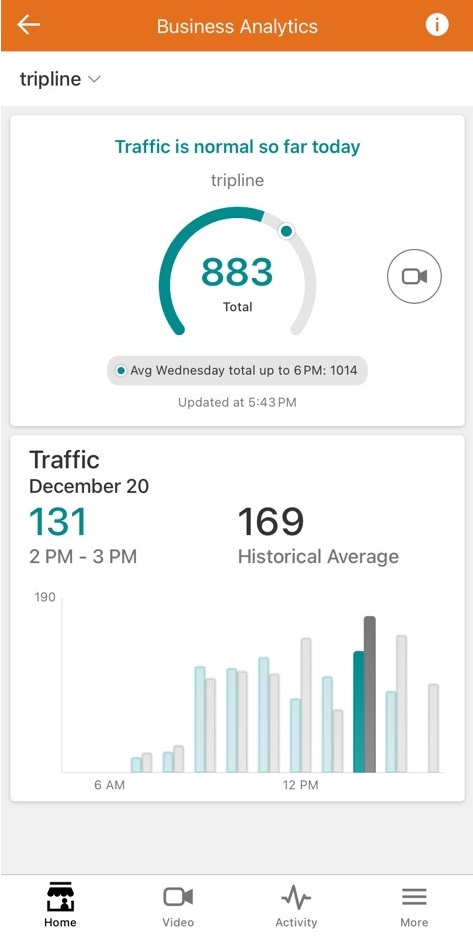
Business Activity Analytics (BAA) on mobile brings the functionality and actionable insights of BAA to a mobile device.
To view daily traffic total:
- Log into the Alarm.com app.
- In Home, tap Business Activity Analytics.
- Using the dropdown menu, select the People Counting rule.
Reports
Reports are set up on the Reports page. Create a new People Counting report, give it a name, select the rules to be reported on, the reporting timeframe (daily, weekly, or monthly) and add recipients. This report is best viewed on the web, although a PDF option is available.
This report summarizes the number of people counted crossing the virtual tripwire throughout the reporting timeframe. Use this report to understand traffic flows throughout a specified area.
Note: When users edit an existing People Counting rule, they can choose to save the data collected from the previous version of the rule. This historical data is included in new reports.
