
Analog camera to Video Server - Installation Guide
Alarm.com’s Video Servers give dealers the flexibility to choose the perfect camera for each customer application. The Video Servers allow the use of any analog CCTV camera in the Alarm.com Video service.
Using a Video Server presents the same user interface, flexible features, and installation wizard as the native Alarm.com IP cameras. The Video Servers are not compatible with third-party IP cameras.
This guide focuses first on issues related to the selection and connection of the analog camera to the servers and then on the connection of the servers to the customer's network.
Types of analog cameras

Box/Enclosure
The box camera is usually comprised of at least two components which are the camera itself and a lens (often sold separately). Different lenses can be used with the camera giving the user more control over what the camera views.
While mostly used indoors, box cameras can be used outdoors with appropriate weather-proof enclosures. The One Channel Video Server is compact enough that it can fit inside some enclosures with the box camera.
Bullet
The bullet camera is typically a compact all-inclusive camera which, unlike box cameras, does not require the purchase of a separate lens. This type of camera is usually the easiest to install but provides minimal flexibility of settings.
Some bullet cameras are rated for outside use without the need for an additional weather-proof enclosure.
They may contain optional LED illuminators to assist with seeing objects in low-light situations.
Dome
Dome cameras can come in models that do not move once mounted (e.g., the Static Mini Dome camera in the preceding picture), and PTZ (Pan/Tilt/Zoom) models (e.g., the Dome camera in the preceding picture) that allow the camera to move around and zoom at any time.
As with the bullet camera, certain dome models are built for outdoor use without the need for an additional weather-proof enclosure. Domes are also available in ruggedized enclosures to protect the camera against would-be vandals.
Analog CCTV camera introduction
Alarm.com Video Servers support both Phase Alternating Line (PAL) and National Television System Committee (NTSC) encoding systems.
- NTSC:
- NTSC is an analog color encoding system used in television systems in Japan, the United States, and other parts of the Americas. NTSC defines the video signal using 525 TV lines per frame at a refresh rate equal to 30 frames per second.
- PAL:
- PAL is an analog color encoding system used in television systems in Europe and many other parts of the world. PAL defines the video signal using 625 TV lines per frame at a refresh rate equal to 25 frames per second.
Analog video display
Analog cameras produce images in different ways than IP/digital cameras do.
- Analog cameras can be viewed by plugging them directly into a TV Video Input port (but not the tuner/antenna input).

- Interlaced scanning versus progressive scan:
- Analog cameras use interlaced scanning (picture is composed of two separate “fields” that are scanned 1/16th of a second apart) instead of progressive scan (used in IP cameras), where the entire picture is scanned at once.

- Analog cameras use interlaced scanning (picture is composed of two separate “fields” that are scanned 1/16th of a second apart) instead of progressive scan (used in IP cameras), where the entire picture is scanned at once.
- Vertical lines:
- Analog cameras vary in their ability to capture fine detail in the horizontal plane, so they are rated by the number of distinct vertical lines they can display in a scene (usually determined by test charts). Typical values vary and include 250 (low-end cameras), 280, 350, 420, 480 and 520 vertical lines.
Camera hardware features
- Lenses:
- Bullet cameras and most dome cameras come with integrated lenses, but box cameras use separate lenses that can be changed by the installer.
- Lenses vary in their focal length. A 3-millimeter lens provides a panoramic view while a 15-millimeter lens zooms in on the center of the scene.
- Vari-focal lenses can be adjusted in the field to achieve the desired focal length.
- Lenses vary in their ability to pass light, as measured by their F-stop, which indicates their effectiveness in low-light situations.
- Many lenses allow adjustment of the iris opening to make sure the optimum amount of light reaches the camera’s image sensor.
Note: If lighting conditions change over time it is most effective to use an auto-iris lens with a compatible camera. - There are several parameters that are important when selecting the right video camera for each installation. Among the most important are:
- Lux rating:
- This parameter is used to measure the effectiveness of the camera in low light conditions, with lower lux ratings indicating better performance in the dark. Some cameras come with built-in Infra-Red (IR) illuminators that allow them to see in total darkness.
Environmental considerations
Cameras are often rated against the IP code that measures their resistance to dust and water.
Example: A camera with an IP66 rating is dust-proof and is immune to direct water sprays from any direction, but it cannot be immersed in water.
The IP rating does not address operating temperature ranges, so this separate camera parameter must be verified to make sure it meets the installation's needs. Outdoor camera enclosures with heater/blowers are available for the most challenging environments.
Connecting an analog CCTV camera to the Video Server
Note: For more information about installing and enrolling an Alarm.com Video Server, see its installation guide in Video Devices.
Typically, the camera is connected to the video server via a single 75-ohm RG-59, RG-6, or RG-11 coax cable. Many analog cameras come with ready-to-use BNC cables, but if not, the cable can be cut to length on-site with the BNC connectors attached to each end.
Types of cable connections include:
- Crimp connectors (common):
- This BNC connector is composed of a few pieces that must be assembled and crimped onto the cable using a special crimping tool.
- Twist-on connectors (common):
- This BNC connector is one piece and simply screws on to the end of the cable. No special crimp tool is needed.
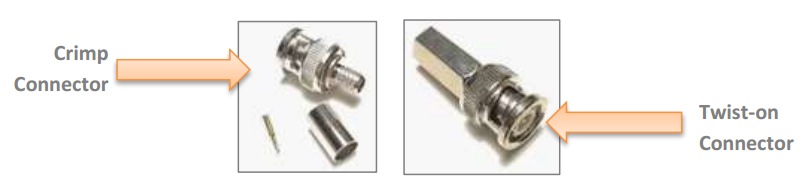
- This BNC connector is one piece and simply screws on to the end of the cable. No special crimp tool is needed.
- Siamese cable (uncommon):
- The camera can be powered from an AC source near the camera or a source near the video server. Siamese cable combines both the coax and power into a single hybrid cable for convenience.
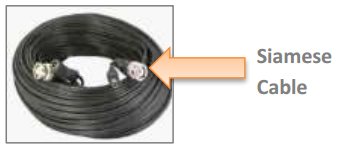
- The camera can be powered from an AC source near the camera or a source near the video server. Siamese cable combines both the coax and power into a single hybrid cable for convenience.
- Video baluns (uncommon):
- Video baluns allow analog video transmission using CAT5 or similar Unshielded Twisted Pair (UTP) cable, which is often easier to install than coaxial cable.
- Most baluns allow transmission of both video and power over the CAT5 cable.

Cable management tips
- Specific limits vary by manufacturer and model, but in general, there are strict limits on the amount of bend that is allowed in coaxial cables.
Caution: Take care to avoid sharp bends that can damage the cable when pulling it around corners and other sharp turns. - Avoid running coaxial cable parallel to AC power cables to make sure the 60Hz signal does not interfere with the video signal.
- The maximum cable length between the camera and the video server is ~600 feet for RG-59 cable and ~900 ft for RG-6 cable.
- It is usually possible to run longer power cables for cameras that are using 24V AC power than 12V DC power.
Sharing analog cameras between a Video Server and a DVR
Users can connect an analog camera to both an Alarm.com Video Server and a DVR/monitor at the same time.
Using Looping Inputs:
DVRs will usually have two BNC connectors per video input. This allows the installer to connect the camera directly to either of the ports and use the remaining port to extend the video to another device.
Note: The video does not end at the DVR and continues on to the video server. Video termination in the DVR must be disabled so the video quality is not degraded (i.e., if video termination is not disabled, the image will look dark). For more information about video termination, see Common camera terms.
Using a Video Distribution Amplifier or BNC splitter:
If the DVR or other video device being used does not have looping video inputs, use either of these devices to duplicate the video signal.
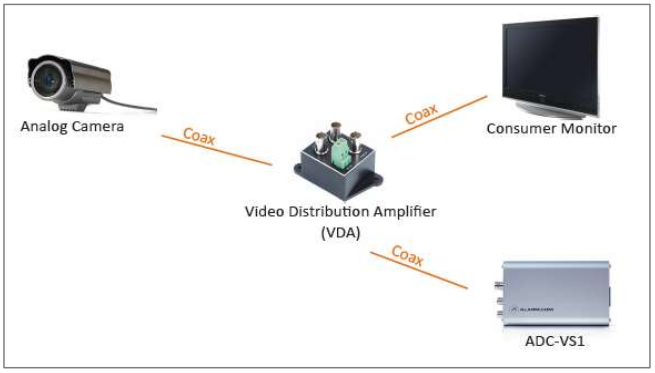
Video Server network connection options
For more information about installing and enrolling an Alarm.com Video Server, see its installation guide in Video Devices.
- Connect using a standard Ethernet cable, if convenient.
- Connect using a HomePlug or PLC device to avoid running long CAT5 cables.

- Connect using a wireless bridge to avoid running long CAT5 cables.

Troubleshooting
If the image that the camera produces is not clear or there is interference of some kind, use the following steps to help resolve the behavior:
- Ghosting/double image:
- Check the coax cabling between the camera and the video server.
- Overly dark image:
- If video is being run through other devices before reaching the video server, verify those devices have their 75-ohm termination disabled.
- Verify iris/exposure settings on the camera.
- Verify the coax cable is not too long (try testing with a shorter cable).
- Loss of color or color is weak:
- The RG-59 camera cable is too long.
- An amplifier may assist in boosting the signal.
- Intermittent noise in the video:
- Verify video cabling is not located near AC power or other possible sources of AC interference such as an AC motor.
- Verify BNC connectors are properly crimped.
- Horizontal lines moving slowly up the video image:
- Verify the coax camera is only grounded at one end (the video server end) to avoid ground loops.
- The camera goes out of focus at night:
- Verify back-focus is properly adjusted.
Common camera terms
- Day/Night:
- Cameras that can be used for well-lit day scenes as well as low-lit night scenes.
Example: A camera may switch from color during the day to black and white at night. Black and white cameras will usually show better image quality with less available light when compared to color cameras.
- Cameras that can be used for well-lit day scenes as well as low-lit night scenes.
- Auto Backlight or Backlight Compensation (BLC):
- The camera compensates for an overly bright scene. Unfortunately, depending on the scene, this may reduce the detail of objects between the bright background and the camera.
- Wide Dynamic Range (WDR):
- Helps to improve image detail on scenes with bright back-light conditions.
Example: If a camera were pointed at a window, the camera would adjust to the outside lighting conditions, and objects between the camera and the window would appear as a silhouette. This technology allows for bright background light without loss of detail to objects inside.
- Helps to improve image detail on scenes with bright back-light conditions.
- Back focus:
- Especially critical with varifocal lenses, back focus is the process of adjusting the physical position of the lens to the charge-coupled device (CCD) so that all focal lengths properly stay in focus in all lighting conditions.
- Video Distribution Amplifier (VDA):
- Used to split an incoming video signal to multiple output signals while maintaining a proper signal level.
- Video termination:
- In CCTV, this typically refers to cabling impedance, and the need for a 75-ohm load to be placed at the end of the RG-59 coax cable. This prevents signal reflection which could cause ghosting or multiple images on the viewing/recording device.
- Most modern DVRs and monitors that allow looping video can enable/disable this termination via a switch or on-screen menu. If video is looped to multiple devices, only the last device in the chain should have termination enabled.