
Upgrade DSC DLS 5 software for DSC PowerSeries Neo
Service Providers who use DSC DLS 5 software on PowerSeries Neo/Pro panels should upgrade to version 1.65 before September 21, 2018. On that date, Alarm.com no longer supports DLS versions earlier than version 1.65 (North American and International versions) due to security-related updates included in the most recent software version. Therefore, non-supported versions of DLS no longer connect to DSC PowerSeries Neo/Pro panels after that date.
DLS 5 can be upgraded using two methods – by using the software itself, or by downloading the newest version on the DSC website – both of which require that the computer being used is connected to the Internet.
To upgrade the DLS 5 in the software:
- Open the DLS 5 software.
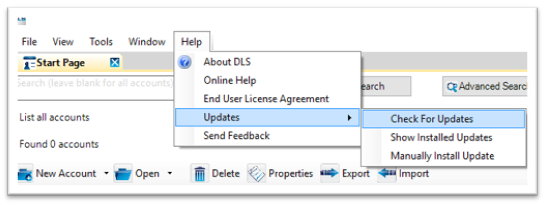
- Click Help on the toolbar.
- Click Updates, then click Check for Updates as shown in the following image:
- In the window that appears, click to select DLS 5 v1.65 as shown in the following image:
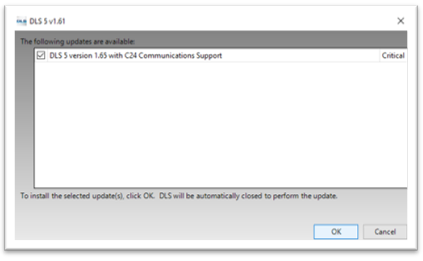
- Click OK to install the selected update.
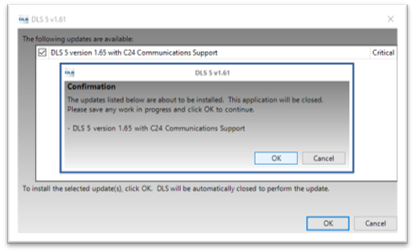
- Click OK in the Confirmation window that appears, as shown in the following image:
- Wait for the package to download – progress can be tracked in the bottom corner of the computer screen, as shown in the following image. Downloading can take several minutes because the software package is large.

- Follow the installation wizard that appears to complete the DLS 5 upgrade.
To download the new DLS 5 version from the DSC website:
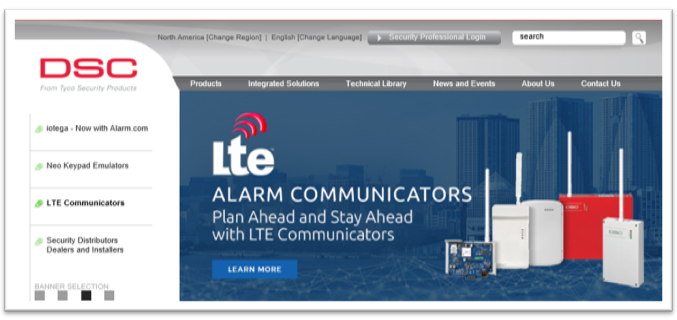
- In an internet web browser, navigate to www.dsc.com.
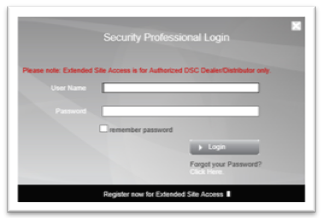
- Click Security Professional Login.
- Log in to the website using your credentials as shown in the following image:
- Once logged in, click Technical Library as shown in the following image:

- Select your region, as shown in the following image:

- Within the Technical Library, click click here to search and download drivers and software as shown in the following image:

- Find and click to expand DLS 5 as shown in the following image:
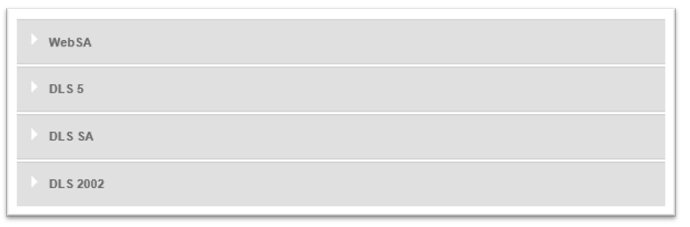
- Click the DLS 5 v1.65 link to download the software as shown in the following image.
Important: Do not navigate away from the page until the software downloads fully. Downloading can take several minutes because the software package is large.

- Make sure the current version of DLS 5 is closed. In the computer's file browser, find the DLS 5 file that just downloaded and double click it.
- Follow the installation wizard that appears to complete the DLS 5 upgrade.