
Enroll, delete, or factory reset a Linear Z-Wave Garage Controller (GD00Z)
|
The content on this page has been written by a third party and is not maintained by Alarm.com. Any questions regarding the installation, maintenance, and/or usage instructions in this guide should be directed to the device manufacturer. To access the full installation guide, see Linear Z-Wave Garage Controller (GD00Z) - Installation Guide. |
Plug in the GD00Z near the security panel/Z-Wave Controller, then follow the steps below.
Note: If using a GD00Z-8-GC, it is recommended to enroll it as an S2 device for enhanced security and encryption features. For information about this process, see Linear Z-Wave Garage Controller (GD00Z-8-GC) - Installation Guide and Add an S2-encrypted Z-Wave device.
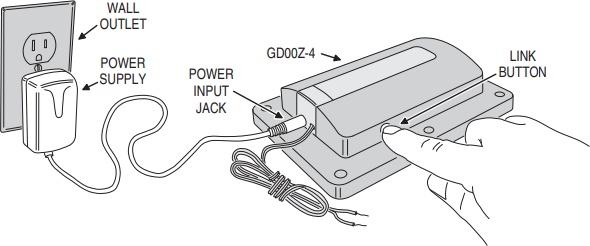
To enroll a Linear Z-Wave Garage Controller into a Z-Wave Network:
- Put the Z-Wave controller into Add Mode.
- Press and release the link button on the GD00Z.
- Verify that the GD00Z was recognized by the Z-Wave controller.
To delete a Linear Z-Wave Garage Controller from a Z-Wave Network:
- Put the Z-Wave controller into Delete Mode.
- Press and release the link button on the GD00Z.
- Verify that the GD00Z was excluded by the Z-Wave controller.
To factory reset a Linear Z-Wave Garage Controller (GD00Z):
The reset process should be performed after the device has been deleted from the Z-Wave network. The reset process causes the GD00Z to forget its network information, but it does not remove it from the Z-Wave controller (i.e., panel/module).
- On the GD00Z, quickly press the link button five times in a row.
- The GD00Z will sound a short beep, flash several double red lights, and then sound a long beep when successfully reset.