User Access Summary Email
Customers can receive User Access Summary emails that summarize login and user code access at-a-glance, every 3 months. Regular review and management of system access is a security best practice that protects customers from intrusion and gives them increased peace of mind.
Features
- Email reminder for customers to regularly review and limit users with login, smart lock, and panel access
- Includes the total number of users with login and user code access to their system with links to their account settings for more details
- Emails are sent to the Primary Login's email address
- By default, email frequency will occur every 90 days
- Dealers can request to change the email frequency (i.e., every 90, 120, or 180 days)
- Customers can opt-out by clicking Manage Reports in the footer of the email
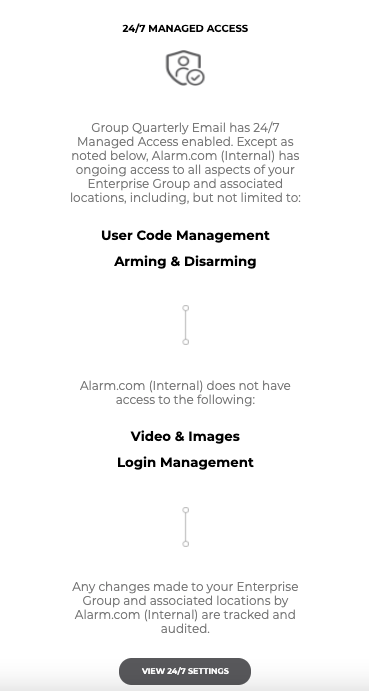
- Commercial customers with 24/7 Managed Account Access enabled will be prompted to check their 24/7 access settings such as arming, disarming, and login management. For more information, see 24/7 Managed Access.
Use cases
- Revoke access when a roommate moves out, as well as when access is no longer needed for a dog walker, service technician, childcare worker, and more.
- Reminder to limit access for your weekly cleaning person from Monday through Friday to Tuesdays and Thursdays only.
- A franchise owner with 24/7 Managed Account Access enabled is reminded and reassured that their dealer continues to provide panel access and Login Management support.
Disable User Access Summary emails
User Access Summary emails can be disabled using the Alarm.com customer website.
Note: User Access Summary emails cannot be edited or deleted, but they can be toggled off.
To disable User Access Summary emails:
- Log in to the Alarm.com customer website.
- Click Activity.
- Click Reports.
- Click the User Codes/Login Summary toggle switch to disable it.
Example User Access Summary emails
The following are examples of User Access Summary emails the customer may receive.
Note: Accounts that are a part of an Enterprise group are excluded from receiving the Logins and User Codes section of the email. Enterprise Groups that are enrolled in 24/7 Managed Access will receive an email notifying them that 24/7 is enabled.
Logins

User Codes

24/7 Managed Access