
ADC-VDB750 wiring guide
ADC-VDB750 wiring guide
Choose the number of ADC-VDB750s, number of chimes, chime type, and power source connected to the same circuit to view a wiring guide for that configuration.
Wire one VDB750 to one mechanical chime and an AC transformer
Transformer: 16-24VAC 10-40VA | Power Module: Not Required | Resistor: Might Be Needed | Chime Type: Mechanical

- Verify that the TRANS terminal on the chime is connected to one of the terminals on the transformer.
- On the ADC-VDB750, attach either one of the wires to the FRONT or REAR terminal of the chime.
- Attach the other wire from the ADC-VDB750 to the remaining open terminal on the transformer.
Note: If the doorbell hums or buzzes, connect one wire lead of the provided resistor to each of the chime terminals used by the ADC-VDB750, leaving the existing wires in place. Polarity does not matter.
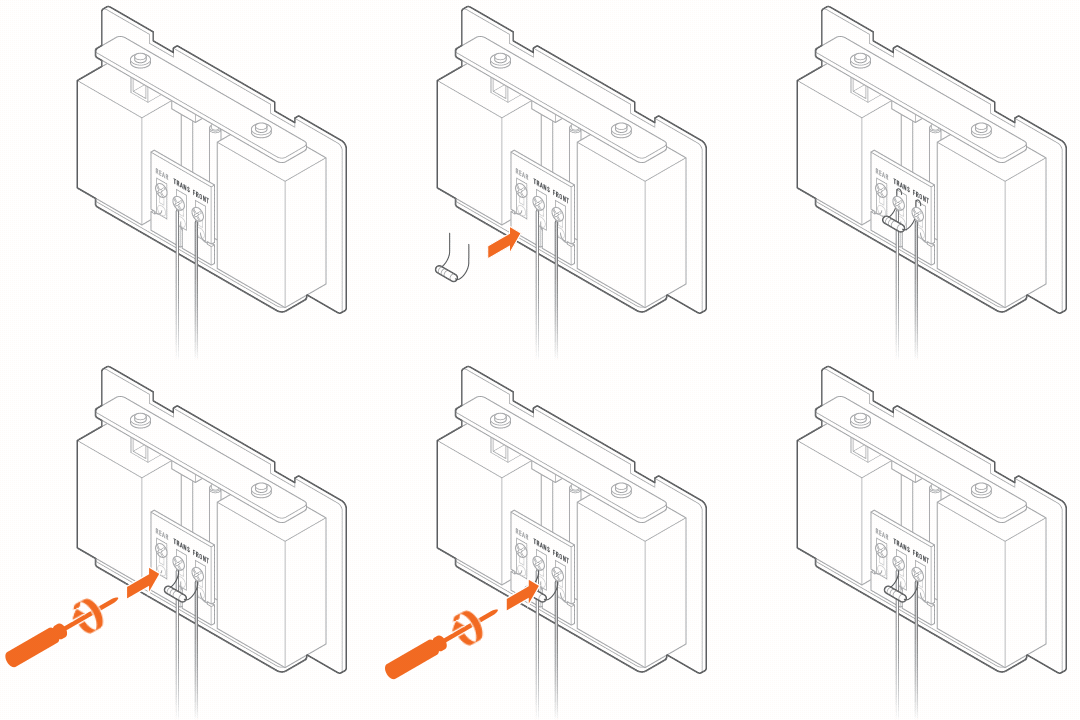
Wire one VDB750 to one mechanical chime and a DC adapter
Transformer: Not Required | Power Module: Not Required | Resistor: Not Required | Chime Type: Mechanical

- Attach one wire from the DC adapter to the ADC-VDB750.
- Attach the other wire from the DC adapter to the TRANS terminal of the chime.
- Attach the remaining wire from the ADC-VDB750 to the FRONT or REAR terminal on the chime.
Wire one VDB750 to one digital chime and an AC Transformer
Transformer: 16-24VAC 10-40VA | Power Module: Required | Resistor: Not Required | Chime Type: Digital

- Verify that the TRANS terminal on the chime is connected to one of the terminals on the transformer.
- Attach one of the wires from the ADC-VDB750 to the remaining open terminal on the transformer.
- Attach the remaining wire from the doorbell to the REAR or FRONT terminal on the digital chime.
- Attach the white wires of the power module interchangeably to the same terminals on the chime as the transformer and doorbell.
Wire one VDB750 to two mechanical chimes with an AC Transformer
Transformer: 16-24VAC, 20-40VA | Power Module: Not Required | Resistor: Might Be Needed | Chime Type: Mechanical

- Wire one terminal of the transformer to the TRANS terminal of each chime. A wire connector may be used to simplify the wiring at the transformer terminal.
- Wire the ADC-VDB750 to the FRONT or REAR terminal of each chime. A wire connector may be used to simplify the wiring at the doorbell backplate.
- Wire the remaining terminal of the transformer to the ADC-VDB750 backplate.
Note: The resistor or mechanical chime dongle can be used as normal, if required, on either or both of the mechanical chimes. For more information, see Power Accessories for the ADC-VDB750 - User Guide.
Wire one VDB750 to two digital chimes with an AC Transformer
Transformer: 16-24VAC 20-40VA | Power Module: Required | Resistor: Not Required | Chime Type: Digital

- On the first power module, attach the white wires interchangeably to the FRONT and TRANS terminals on the first chime.
- On the second power module, attach the white wires interchangeably to the FRONT and TRANS terminals on the second chime.
- Wire one terminal of the transformer to the TRANS terminal of each chime. A wire connector may be used to simplify the wiring at the transformer terminal.
- Wire the ADC-VDB750 to the FRONT terminal of each chime. A wire connector may be used to simplify the wiring at the doorbell backplate.
- Wire the remaining terminal of the transformer to the ADC-VDB750 backplate.
Wire one VDB750 with no chime and an AC Transformer
Transformer: 16-24VAC 10-40VA | Power Module: Not Required | Resistor: Not Required | Chime Type: None

Connect both wires from the AC transformer to the terminals on the back of the ADC-VDB750.
Note: Unlike other Alarm.com video doorbells, the ADC-VDB750 does not require a resistor for installation without a chime.
Wire one VDB750 with no chime and a DC adapter
Transformer: Not Required | Power Module: Not Required | Resistor: Not Required | Chime Type: None

Connect both wires from the DC adapter to the terminals on the back of the ADC-VDB750.
Wire one VDB750 with no chime and an AC Transformer
Transformer: 16-24VAC 10-40VA | Power Module: Not Required | Resistor: Not Required | Chime Type: None
Connect both wires from the AC transformer to the terminals on the back of the ADC-VDB750.
Note: Unlike other Alarm.com video doorbells, the ADC-VDB750 does not require a resistor for installation without a chime.
Wire one VDB750 with no chime and a DC adapter
Transformer: Not Required | Power Module: Not Required | Resistor: Not Required | Chime Type: None
Connect both wires from the DC adapter to the terminals on the back of the ADC-VDB750.
Wire two VDB750s to one mechanical chime and an AC Transformer
Transformer: 16-24VAC 20-40VA | Power Module: Not Required | Resistor: Not Required | Chime Type: Mechanical
| Wiring | Diagram |
|---|---|
|
 |
Note: The resistor or mechanical chime dongle can be used as normal, if required, on the mechanical chime. For more information, see Power Accessories for the ADC-VDB750 - User Guide.