
Bypass a sensor on a Qolsys IQ Hub
On the Qolsys IQ Hub, it is possible to bypass open contact sensors or sensors with a trouble condition when arming a system using the Alarm.com customer website or Alarm.com app.
How does it work?
When sending a remote arming command, there's the option to:
- Force Bypass - This option bypasses any sensors that would prevent arming (e.g., open, tamper, low battery, offline, etc.).
- A motion sensor that has been activated, such as one that has recently detected motion, would not be bypassed if the panel is being armed away.
- Force Bypass appears and is automatically selected when specific conditions are present. For more information about when a force bypass automatically occurs, see Why is Force Bypass automatically selected in the app when attempting to arm the system?.
- Bypass Specific Sensors - This option is available on panel software version 3.1.0+ and allows the user to select specific sensors to bypass, regardless of the sensor's status.
- Only the first 32 bypassable sensors appear for this option. Life safety zones do not appear and cannot be selected to be bypassed.
Other remote features on Alarm.com that would arm the system (i.e., Arming Schedules, Auto-Re-arming, Smart Arming) arms the system like a remote arming command. Therefore, the panel will automatically force bypass any sensors that would prevent arming.
Remotely bypass sensors while arming
Sensors can be bypassed while arming using the Alarm.com app and Alarm.com customer website.
To bypass a sensor while arming using the Alarm.com app:
- Log in to the Alarm.com app.
- In the Security System card, click
 .
- Select bypass option:
- To bypass all sensors that would prevent the system from arming, tap Force Bypass.
- To select which sensors to bypass, tap Bypass Specific Sensors.
Important: Bypassing specific sensors requires panel software version 3.1.0+.
- Tap either Arm (Stay) or Arm (Away), depending on the type of arming command desired.
- If Bypass Specific Sensors was selected, tap to select which sensors to bypass and then tap Arm.

- When sensors are bypassed, the Security System card displays Sensors Bypassed.
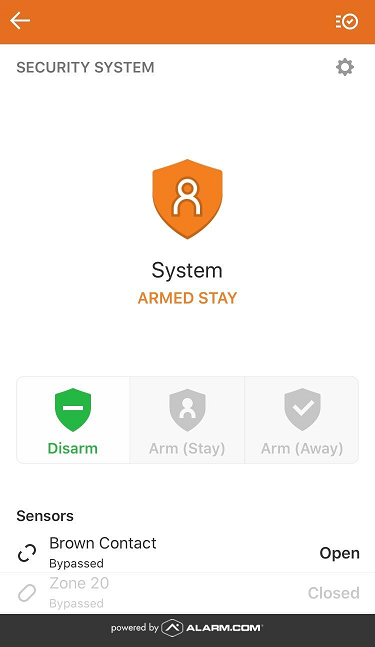
To bypass a sensor while arming using the Alarm.com customer website:
- Log in to the Alarm.com customer website.
- In the Security System card, click .
- Select bypass option:
- To select which sensors to bypass, click Bypass Specific Sensors.
Important: Bypassing specific sensors requires panel software version 3.1.0+.
- To bypass all sensors that would prevent the system from arming, click Force Bypass.
- To select which sensors to bypass, click Bypass Specific Sensors.
- Click either Stay or Away, depending on the type of arming command desired.
- If Bypass Specific Sensors was selected, click to select which sensors to bypass and then click Save.
- When sensors are bypassed, the Sensors and Recent Activity card displays the sensors as Bypassed.
Configure bypassed sensors
Sensors can be configured to be bypassed/unbypassed using the Alarm.com app or Alarm.com customer website.
Important: The system must be disarmed to configure bypassed sensors.
To configure bypassed sensors using the Alarm.com app:
- Log in to the Alarm.com app.
- In the Security System card, tap
 .
- Tap Bypass Sensors.
- Tap to deselect sensors that are bypassed.
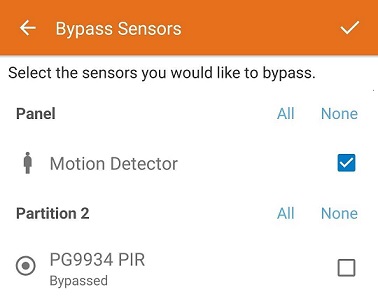
- Tap
 to save.
To configure bypassed sensors using the Alarm.com customer website:
- Log in to the Alarm.com customer website.
- In the Security System card, click
 .

- Click to deselect sensors that are bypassed.
- Click Save.